Introduction
The purpose of typstable is to produce publication ready tables for Quarto documents targeting the Typst format. Typst is a modern, open-source, markup-based typesetting system that provides an alternative to LaTeX for rendering PDF documents. In this article I show how to use the typstable package.
Getting Started
Create a basic table with tt().
library(typstable)
sans_font <- '#set text(font: "Arial")'
tbl <- tt(mtcars[1:5, 1:3], preamble = sans_font)
tbl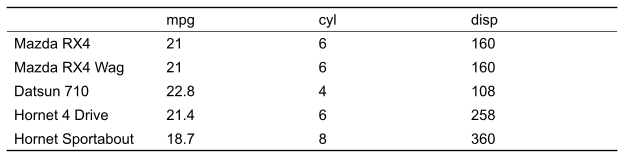
Apply formatting to cells, rows, and columns
Format specific parts of the table with tt_column(),
tt_row(), and tt_cell(). Columns can be
targeted using tidyselect syntax.
tbl <- tt(mtcars[1:5, 1:3], preamble = sans_font) |>
  tt_column(1:3, align = "center") |>
  tt_row(3, fill = "yellow") |>
  tt_cell(2, 2, bold = TRUE, rotate = 45, fill = "lightgrey")
tbl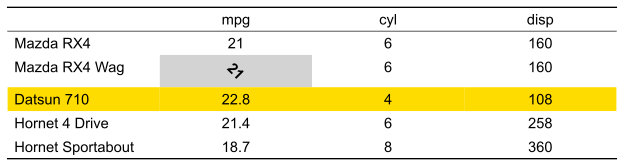
Table Styling
Use tt_style() to customize the table appearance.
tbl <- tt(mtcars[1:5, 1:3],
          col_names = c("", "Miles/Gallon", "Cylinders", "Displacement"),
          preamble = sans_font,
          rownames = TRUE) |>
  tt_style(
    striped = TRUE,
    inset = "4pt"
  )
tbl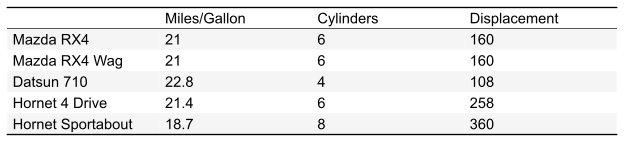
Column Widths
Control relative column widths with tt_widths().
tbl <- tt(mtcars[1:5, 1:3], preamble = sans_font, rownames = TRUE) |>
  tt_style(stroke = TRUE) |>
  tt_widths(.rownames=8,mpg=1,cyl=1,disp=1)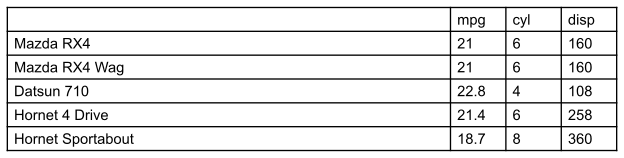
Spanning Headers
Add spanning headers with tt_header_above():
tbl <- tt(mtcars[1:6, c("mpg", "qsec", "cyl", "disp", "hp", "wt")], preamble = sans_font, rownames = TRUE) |>
  tt_header_above(c(" " = 1, "Performance" = 2, "Characteristics" = 4), line_sep = "5pt") |>
  tt_column(1, width = "25%")
tbl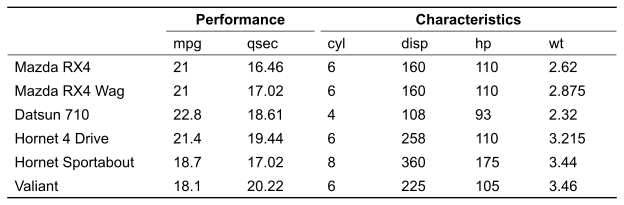
Row Grouping
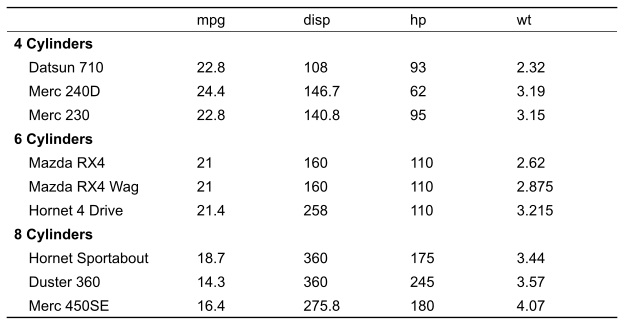
Group rows with tt_pack_rows(). Sort the data by a
grouping variable, then use table() to compute group sizes
for the index parameter.
cars <- mtcars[order(mtcars$cyl), c("mpg", "disp", "hp", "wt", "cyl")]
cars <- do.call(dplyr::bind_rows, lapply(split(cars, cars$cyl), head, 3))
groups <- table(cars$cyl)
groups <- setNames(as.integer(groups), paste(names(groups), "Cylinders"))
tbl <- tt(cars, cols = c(mpg, disp, hp, wt), preamble = sans_font, rownames = TRUE) |>
  tt_pack_rows(index = groups) |>
  tt_column(1, width = "30%")
tbl